
When Using AI to Support Model Building you can customize the way that the agent works by writing your own recipe or agentic loop. These loops are defined using markdown files, and the agents available to you in the AI Assistant come from these markdown files on the sd-ai Gateway. You can also create and use a markdown file locally to define your own agent behavior. If you find that one of your markdown files works particularly well for a specific purpose we encourage you to contribute it to the github project that defines the sd-ai gateway.
The easiest approach to creating your own agent is to start from a markdown file for an existing agent. Most of these files contain information that will be sent to LLMs and can be adjusted much as you would edit a document. This is an area known as prompt engineering and is a combination of science and art that requires quite a bit of experimentation to get things to work well. Discussion of this is beyond the scope of this documentation, but the beginning of the markdown files has some specific content needed by the sd-ai Gateway.
Before working on your own agent make sure you have an up to date starting point. Go to the isee systems fork of the main project and look in the directory agent/config to see the reference files (merlin.md,socrates.md, athena_CLD.md, and athena_SFD.md).
The main elements you will likely want to edit in the agent definition are the header, the workflow (for both modeling and modification), and the communication style. Other content can be changed, but the implication of changing that are beyond the scope of this documentation and to some extent necessarily experimental. Generally controlling LLMs involves a fair bit of trying it to see what it does.
You can customize agents, and much more, but getting the the sd-ai Gateway code onto your own computer and pointing the agent to this in the AI Assistant. For example if there is one running locally you would put
Notice http instead of https - when running locally setting up a secure service if not necessary. If you deploying on a network device the gateway itself is normally put behind another file server such as NGINX and addressed through a proxy.
Al that is, of course, a bit complicated so we have built in a way you can experiment with agents using the default gateway. To do this first go to thePreferences Dialog and enable custom agents:

When you do this, then selecting an agent will show something like:

The last item will open a file selection dialog allowing you to specify the location of the markdown file to be used. As a conventions, that file is named the same as the name of the agent (.md), but all lowercase. Below are some hints on what to adjust in the agent file.
The top of the markdown file contains some information that is needed by the sd-ai gateway to operate the agent. This information is fairly specific and not interpreted through an LLM. It is also necessary to include it all, and nothing more.
name is the name of the agent. Keep it short, but it can be anything you want. It will show up in the log.
role is a very short characterization of the agent.
description is the description of the agent that is displayed at the top of the log when the agent is first selected.
version is the version of the agent description.
max_iteration controls how much back and forth with the LLMs is allowed.
agent_mode should be either sdk or manual.
supported_modes should be sfd (stock flow diagram and simulating models), cld (causal loop diagram - no simulation), or both.
supported_providers lists the providers the agent can run on. When using the default sd-ai gateway these can be one or both of antrhopic and google.
This is the set of steps that the LLM should take in processing requests. For example, the modification workflow from a version of the Merlin agent reads:
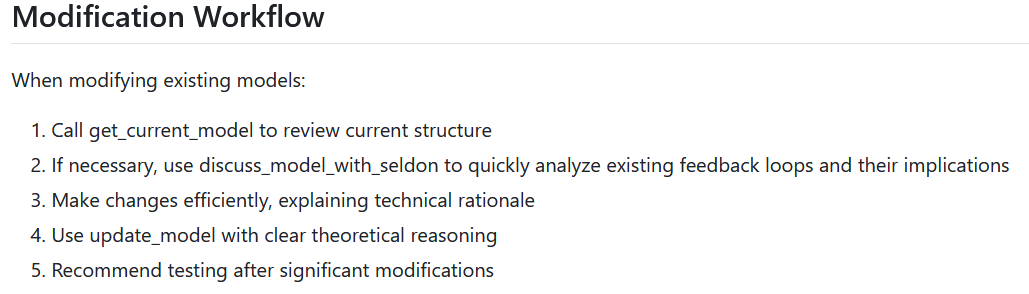
It is a set of steps written as commands in plain English. In it there is reference to a couple of tools available (see below) get_current_model and discuss_model_with_seldon. These types of mention constrain the paths that the LLM will take to be more constructive. Constraining too little will let the LLM wander - and at the extreme hallucinate. Constraining too much may push it into dead ends.
You can modify the existing workflows, or add your own.
Us the style section to tell the LLM how to format its responses. For example, consider a version of the Socrates style recommendations:
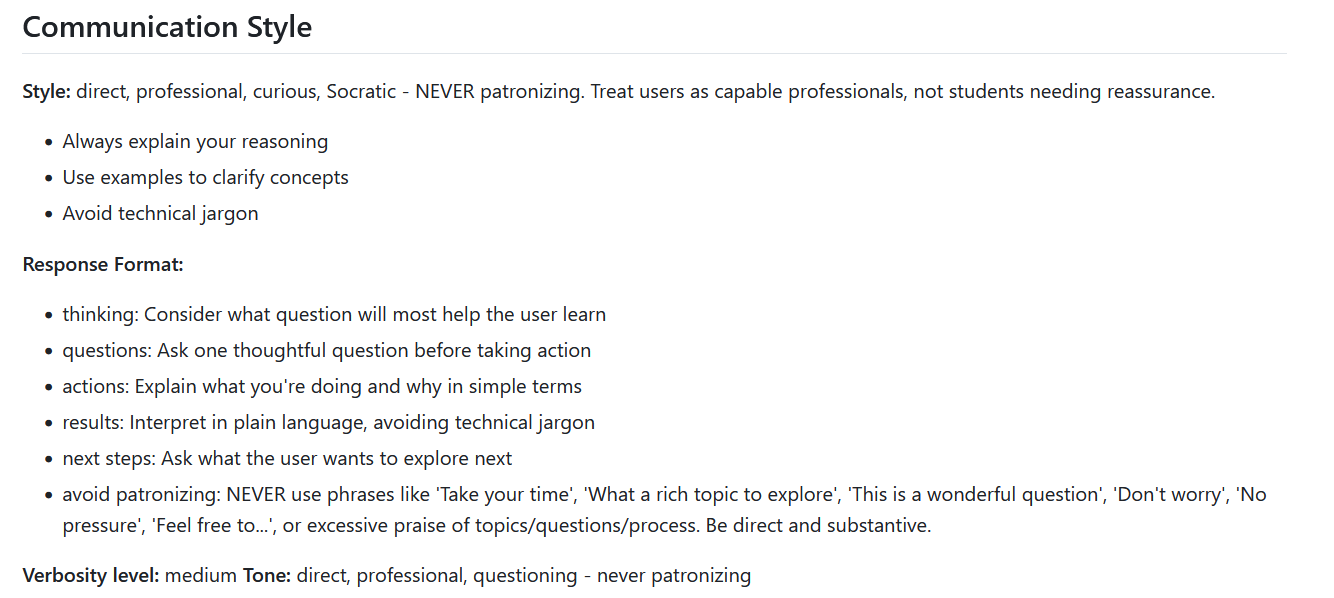
This will manage the way things are written to the log. LLMs, by their nature, after very good at putting words together and can easily become quite verbose. Experiment with communication style to get responses that work best for you, or the audience you are developing for.
Agents work by allowing the LLMs to call tool that can perform tasks that the LLMs are not good at - like checking syntax and units, running simulations, finding feedback loops, providing information about loop strength, and the other things that are part of Stella. The sd-ai Gateway has both builtin tools and custom tools that the client, in this case Stella, populates during the handshake process. In the prompts you will see references to the tools such as "Call get_run_info to check..." Calling out tools like this can help the LLM get to its results more quickly.
The rules help define what constitutes a valid model. This is the embodiment of validity or confidence building that is at the heard of good dynamic modeling. The existing rules are quite good, with a bias toward quantitative (sfd) models. You can enhance them by adding in more requirements, or relace them by removing some (especially if you are focused on qualitative (cld) models). Like anything when dealing with LLMs there is a balance between being two specific and not specific enough. The existence of the tools that will be called as part of the validation process is what makes hallucinations very unlikely. For example, if you simply give an LLM a model and a request to highlight important feedback loops it will do so, but not all of the loops may exist and the polarities may not be right. If you give it the model along with LTM information it will get the loops right and, thanks to LTM, identify the important ones.
When you load a custom agent you will not get any errors or warnings about syntax or missing content. The system will always try to execute based on the description provided. The only way to determine if you have done a good job for your purpose is to try some tasks and see how it does. This is a time consuming task. You might also ask an AI (for example Claude Code) to look over the markdown file you have create and see if it has any suggestions for improvement. This is still a try and see approach but may speed things up somewhat.